
HP 9000 rp8420 Server - User Service Guide, Fifth Edition
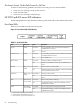
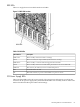
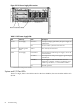
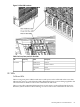
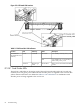
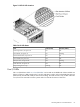
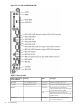
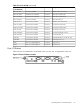
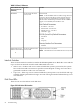

Table 5-8 Core I/O Buttons
FunctionLocationButton Identification (as
silk-screened on the
bulkhead)
Resets the MP
NOTE: If the MP RESET button is held for longer than five
seconds, it will clear the MP password and reset the LAN,
RS-232 (serial port), and modem port parameters to their
default values. The default password for the MP is Admin
(upper case A intended) when the MP is reset.
LAN Default Parameters
• IP Address—192.168.1.1
• Subnet mask—255.255.255.0
• Default gateway—192.168.1.1
• Hostname—gsp0
RS-232 (Serial Port) Default Parameters
• 9600 baud
• 8 bits
• No parity
Remote/Modem Port Parameters
• Disabled
To the far left side of the
core I/O card
MP RESET
Request OL* for this core I/O slot
NOTE: The OLR function is not enabled for the core I/O card.
To the far right side of the
core I/O card
OLR (Symbol next to
button is shown below)
Interlock Switches
There are three interlock switches located in the HP 9000 rp8420 server. Both side covers and the
top cover have an interlock switch located underneath each cover.
• Side Covers—If either side cover is removed while the system is powered on, the system
fans on the front and rear increase in speed to ensure adequate cooling. An event code is
generated to indicate a side cover was removed.
• Top Cover—If the top cover is removed while the system power is on, the PCI-X card cage
assembly I/O fan speed will not change. An event code is generated to indicate the top cover
was removed.
Disk Drive LEDs
There are two tri-color LED on each disk drive.
Figure 5-9 Disk Drive LED Location
90 Troubleshooting