
HP 9000 rp8420 Server - User Service Guide, Fifth Edition
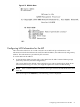
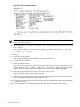
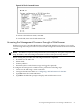
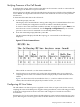
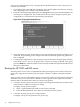
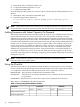

Figure 4-13 The lc Command Screen
2. NOTE: The value in the “IP address” field has been set at the factory. Obtain the LAN IP
address from the customer.
3. At the prompt, Do you want to modify the configuration for the customer
LAN?, enter y.
The current IP address is shown; then the following prompt is displayed: Do you want
to modify it? (Y/[N])
4. Enter y.
5. Enter the new IP address.
The customer shall provide this address for network interface 0.
6. Confirm the new address.
7. Enter the MP Hostname.
This is the hostname for the customer LAN. The name can be as many as 64 characters, and
include alpha numerics, - (dash), _ (under bar), . (period), or a space. It is recommended
that the name be a derivative of the complex name. For example, Acme.com_MP.
8. Enter the LAN parameters for Subnet mask and Gateway address.
This information shall come from the customer.
9. When step 7 is completed, the system will indicate the parameters have been updated and
return to the MP Command Menu prompt (MP:CM>).
10. To check the LAN parameters and status, enter the ls command at the MP Command Menu
prompt (MP:CM>).
11. A screen similar to the following will display allowing verification of the settings:
72 Cabling and Power Up