
HP 9000 rp8420 Server - User Service Guide, Fifth Edition
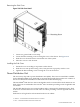
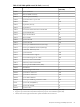
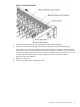

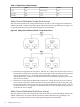

Figure 3-2 PCI I/O Slot Details
7. Wait for the green power LED to stop blinking and remain solid green.
8. Check for errors in the hotplugd daemon log file (default: /var/adm/hotplugd.log).
The critical resource analysis (CRA) performed while doing an attention button initiated
add action is very restrictive and the action will not complete—it will fail—to protect critical
resources from being impacted. For finer control over CRA actions use pdweb or the olrad
command. Refer to the Interface Card OL* Support Guide located on the Web at
http://docs.hp.com for details.
9. Replace the top cover.
10. Connect all cables to the installed PCI card.
PCI/PCI-X Card Cage Assembly I/O Cards 57