
HP 9000 rp8420 Server - User Service Guide, Fifth Edition
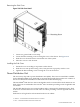
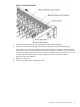


2. Slide the disk drive into the chassis; a slow, firm pressure is needed to properly seat the
connector.
3. Press the front locking latch to secure the disk drive in the chassis.
4. Spin up the disk by entering one of the following commands:
#diskinfo -v /dev/rdsk/cxtxdx
#ioscan -f
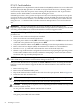
Removable Media Drive Installation
The DVD drive or DDS-4 tape drive is located in the front of the chassis. The server power must
be turned off before attempting to install it. Refer to “Shutting Down nPartitions and Powering
Off Hardware Components” in the Service Guide for the HP 9000 rp8420 server for more
information.
CAUTION: Observe all ESD safety precautions before attempting this procedure. Failure to
follow ESD safety precautions could result in damage to the HP 9000 rp8420 server.
If an upper drive is installed, it will need to be removed before installing a lower drive.
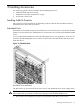
1. Remove filler panel.
2. Connect the cables to the rear of the drive.
3. Install left and right media rails and clips.
4. Slide the drive in the chassis. Fold the cables out of the way.
The drive easily slides into the chassis; however, a slow, firm pressure is needed for proper
seating. The front locking tab will latch to secure the drive in the chassis.
PCI/PCI-X Card Cage Assembly I/O Cards
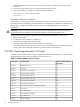
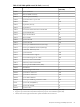
A number of PCI and PCI-X I/O cards are supported in the HP 9000 rp8420 server. Known cards
supported at the release of this manual are shown in Table 3-1.
Table 3-1 HP 9000 rp8420 server I/O Cards
Number of Cards Supported
(B-Bootable)
Card DescriptionPart Number
16FDDI Dual AttachA3739B
16FWD SCSIA4800A
16Gigabit Ethernet (1000B-SX)A 4926A
16Gigabit Ethernet (1000B-T)A4929A
16ATM 622 (MMF connector)A5483A
16ATM 155 (UTP5 connector)A5515A
16
1
Next Generation 1000B-SXA6847A
16aNext Generation 1000B-TA6825A
16
2
PCI-X Dual Channel 2 GB Fibre Channel HBAA6826A
16Ultra2 SCSIA5149A
162-port Ultra2 SCSIA5150A
16
3
Fibre Channel PCI AdapterA5158A
16B2-port FWD SCSIA5159B
1610/100B-TX (RJ45)A5230A
54 Installing Accessories