
HP 9000 rp8420 Server - User Service Guide, Fifth Edition


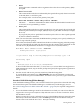


3. From the ISL prompt, issue the appropriate Secondary System Loader (hpux) command to
boot the HP-UX kernel in the desired mode.
Use the hpux loader to specify the boot mode options and to specify which kernel (such as:
/stand/vmunix) to boot on the nPartition.
• To boot HP-UX in single-user mode:
ISL> hpux -is boot /stand/vmunix
• To boot HP-UX at the default run level:
ISL> hpux boot /stand/vmunix
To exit the ISL prompt and return to the BCH interface, issue the EXIT command instead
of specifying one of the above hpux loader commands.
Refer to the hpux(1M) manpage for a detailed list of hpux loader options.
Example E-1 Example Single-User HP-UX Boot
ISL Revision A.00.42 JUN 19, 1999
ISL> hpux -is /stand/vmunix
Boot
: disk(0/0/2/0/0.13.0.0.0.0.0;0)/stand/vmunix
8241152 + 1736704 + 1402336 start 0x21a0e8
....
INIT: Overriding default level with level ’s’
INIT: SINGLE USER MODE
INIT: Running /sbin/sh
#
4. Exit the console and service processor interfaces if finished using them.
To exit the BCH environment type ^B (Control-B); this exits the nPartition console and
returns to the service processor Main Menu. To exit the service processor, type X at the Main
Menu.
Procedure E-5 Single-User Mode HP-UX Booting [EFI Shell]
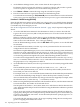
From the EFI Shell environment, boot in single-user mode by stopping the boot process at the
HPUX.EFI interface (the HP-UX Boot Loader prompt, HPUX>) entering the boot -is vmunix
command. The EFI Shell is available only on HP Integrity servers.
See “ACPI Configuration for HP-UX Must Be “default”” (page 196) for required configuration
details.
1. Access the EFI Shell environment for the nPartition on which you want to boot HP-UX in
single-user mode.
Login to the service processor (MP or GSP) and enter CO to access the Console list. Select
the nPartition console.
When accessing the console, confirm that you are at the EFI Boot Manager menu (the main
EFI menu). If at another EFI menu, select the Exit option from the sub-menus until you
return to the screen with the EFI Boot Manager heading.
From the EFI Boot Manager menu, select the EFI Shell menu option to access the EFI Shell
environment.
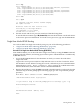
2. Access the EFI System Partition (fsX: where X is the filesystem number) for the device
from which you want to boot HP-UX.
200 Operating System Boot and Shutdown