
HP 9000 rp8420 Server - User Service Guide, Fifth Edition


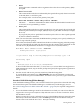

— acpiconfig enable softpowerdown When set, acpiconfig enable softpowerdown
causes nPartition hardware to be powered off when the operating system issues a
shutdown for reconfig command (for example, shutdown -h or shutdown /s).
This is the normal behavior on rx8620 and rx7620 servers with a windows ACPI
configuration setting.
When softpowerdown is enabled on an rx7620 or rx8620 server, if one nPartition is
defined in the server then halting the operating system powers off the server cabinet
(including all cells and I/O chassis). On an rx7620 or rx8620 server with multiple
nPartitions, halting the operating system from an nPartition with softpowerdown
enabled causes only the resources on the local nPartition to be powered off.
To power on hardware that has been powered off, use the PE command at the
management processor command menu.
— acpiconfig disable softpowerdown When set, acpiconfig disable
softpowerdown causes nPartition cells to remain at a boot-is-blocked state when the
operating system issues a shutdown for reconfig command (for example, shutdown
-h or shutdown /s). In this case an OS shutdown for reconfig makes the nPartition
inactive.
This is the normal behavior on rx8620 and rx7620 servers with an ACPI configuration
setting of default or single-pci-domain.
To make an inactive nPartition active, use the management processor BO command to
boot the nPartition past the boot-is-blocked state.
Booting HP-UX
This section covers the following methods of booting HP-UX:
• HP-UX Booting — The standard ways to boot HP-UX. Typically this results in booting
HP-UX in multi-user mode.
• Single-User Mode HP-UX Booting — How to boot HP-UX in single-user mode.
• LVM-Maintenance Mode HP-UX Booting — How to boot HP-UX in LVM-maintenance
mode.
Booting HP-UX 195