
HP 9000 rp8420 Server - User Service Guide, Fifth Edition
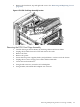
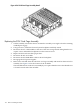
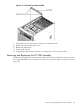

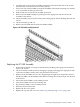
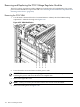
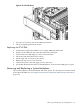
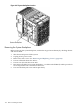
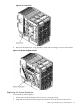
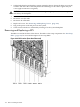

Figure 6-56 PCI OLR Assembly Location (Rear of Server with Top Cover Removed)
Removing the PCI OLR Assembly
Figure 6-57 PCI MRL Detail
NOTE: It is highly recommended that extra PCI MRLs are available as these can be easily broken
when removing or replacing the MRLs.
1. Shut down and power off the server.
2. Remove the top and right side covers. See “Removing and Replacing Covers” (page 104).
3. Loosen the captive screws and remove the PCI access panel.
4. Disconnect the PCI OLR cable from the PCI backplane. The connector is located on the cell
board side of the system.
5. Flip all 16 of the PCI MRLs to the OPEN position.
164 Removal and Replacement