
HP 9000 rp8420 Server - User Service Guide, Fifth Edition

Removing a DIMM
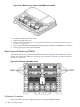
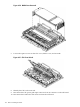
1. Identify the defective DIMMs using Figure 6-27 to aid with DIMM location on cell board.
Figure 6-27 DIMM Detail with Locations
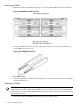
2. Using both DIMM removal tools, place the grooved side of each tool on each side of the
target DIMM. See Figure 6-28.
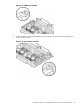
Figure 6-28 DIMM Removal Tools
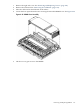
3. Seat the tool tips down to limit, then leverage connector latches outward to unseat the DIMM
from the memory slot.
Replacing a DIMM
IMPORTANT: Configuration restrictions apply when installing 4 GB DIMMs. 4 GB DIMMs
cannot be mixed with any other sized DIMMs on the same cell board. However, 4 GB DIMMs
can be mixed with other sized DIMMs within the same nPartition as long as they are not mixed
on the same cell board.
1. Orient the replacement DIMM connector key over the memory slot.
138 Removal and Replacement