
HP 9000 rp8420 Server - User Service Guide, Fifth Edition
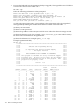

CAUTION: Repeat the firmware update procedure immediately for all entities failing to
update successfully. DO NOT RESET or AC POWER CYCLE until you get a message
indicating that all updates have completed successfully.
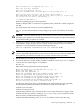
6. Activate the new Firmware for all updated components by cycling power to the cell, following
these specific steps:
a. Eject the Cell.
b. Reinsert the Cell.
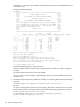
7. Following the Cell AC power cycle, verify the updated firmware revisions by using the
sysrev command.
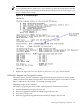
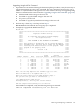
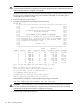
Example (rp8420 with SEU):
MP:CM> sysrev
Cabinet firmware revision report
PROGRAMMABLE HARDWARE :
System Backplane : GPM FM OSP
------- ------- -------
1.002 1.002 1.002
PCI-X Backplane : LPM HS
------- -------
2.000 1.000
Core IO : Master Slave
-------- -------
2.009 2.009
LPM PDHC
------- -------
Cell 0 : 1.002 1.007
Cell 1 : 1.002 1.007
Cell 2 : 1.002 1.007
Cell 3 : 1.002 1.007
FIRMWARE:
Core IO
Master : A.006.012
Event Dict. : 0.009
Slave : A.006.012
Event Dict. : 0.009
Cell 0
PDHC : A.003.023
Pri SFW : 21.003 (PA)
Sec SFW : 21.003 (PA)
Cell 1
PDHC : A.003.023
Pri SFW : 21.003 (PA)
Sec SFW : 22.002 (PA)
Cell 2
PDHC : A.003.023
Pri SFW : 21.003 (PA)
Sec SFW : 22.002 (PA)
Cell 3
PDHC : A.003.023
Pri SFW : 21.003 (PA)
Sec SFW : 22.002 (PA)
IO Cabinet FPGA and Firmware revision report
System Backplane : GPM FM OSP
------- ------- -------
1.002 1.002 1.002
PCI-X Backplane : LPM HS
------- -------
Removing and Replacing a Cell Board 125