
HP 9000 rp8420 Server - User Service Guide, Fifth Edition
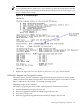
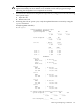
NOTE (1): X.X.X is the version number corresponding to the version of the PDHC firmware
on the other cells.
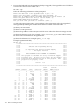
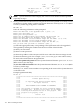
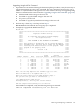
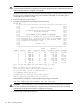
Example (rp8420 with SEU):
MP:CM> fw
*********************************************************************
***** *****
***** Firmware Update Utility *****
***** *****
***** (C) Copyright 2001 Hewlett-Packard Company *****
***** All Rights Reserved *****
***** *****
***** THIS PROGRAM IS NOT LICENSED TO CUSTOMERS *****
***** *****
***** This program is intended for use by trained HP support *****
***** personnel only. HP shall not be liable for any damages *****
***** resulting from unauthorized use of this program. This *****
***** program is the property of HP. *****
***** *****
***** Version 4.00 *****
***** *****
*********************************************************************
Flash Current
Number Cabinet Name Partition Handle Firmware Version Comments
------ --------- -------- ---------- -------- ------------------ --------
(1) 1 0 MP 0 0 0 5.022 Master
(1) 2 0 MP 1 1 1 5.022 Slave
(3) 3 (2) 8 MP 0 0 32768 5.022 Master
(3) 4 (2) 8 MP 1 1 32769 5.022 Slave
5 0 PDHC 0 0 256 3.012 -
6 0 SFW 0 0 320 21.003 -
7 0 PDHC 1 1 257 3.014 -
8 0 SFW 1 1 321 21.003 -
(3) 9 0 PDHC 2 0 258 3.014 -
(3) 10 0 SFW 2 0 322 21.003 -
(3) 11 0 PDHC 3 1 259 3.014 -
(3) 12 0 SFW 3 1 323 21.003 -
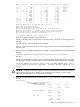
Enter the Entities to be upgraded (Ex: 3,4,10): 5
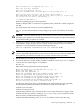
Enter your user name: anonymous
Enter your user password: ********
Enter the ip address where the firmware can be found: 192.1.1.1
Enter the path where the firmware can be found: /dist/versionX_X
Enter the filename of the firmware image for the PDHC: pdhc_A.X.X.X.bin
Are you sure that you want to continue(Y/N): y
**** Firmware Updating PDHC ****
Firmware updating progress will be reported.
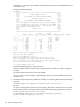
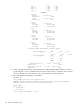
NOTE (1): When a SEU is connected to an rp8420 system, cabinet id 8 will be assigned to
the SEU.
(2): These entities will only be seen on the rp8420.
(3): X.X.X is the version number corresponding to the version of the PDHC Firmware on
the other cells.
5. Ensure the entity selected was updated successfully. A successful update returns the following
message:
Firmware Update has completed successfully for all entities.
MP:CM>
An unsuccessful update results in an error message. If the FTP connection was successful,
but the update failed, a warning will be noted for the entity being updated. For example:
Firmware Update failed for entity SFW 0.
DO NOT REBOOT SFW 0 until it has been successfully updated!!!
Firmware Update completed with errors.
124 Removal and Replacement