
HP 9000 rp8420 Server - User Service Guide, Fifth Edition
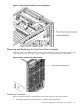
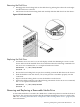
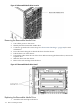
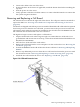

2. Remove the front bezel.
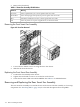
Table 6-1 Smart Fan Assembly LED definitions
MeaningLED State
Fan is at speed and in sync or not at speed less than 12 seconds.On Green
Fan is not keeping up with speed/sync pulse for greater than 12 seconds.Flash Yellow
Fan failed or stalled, has run slow, or fast for greater than 12 seconds.Red
Fan is not present, or no power is applied to fan, or the fan has failed.Off
Removing the Front Smart Fan Assembly
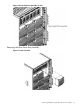
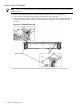
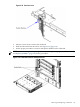
Figure 6-9 Front Fan Removal
1. Loosen the two thumb screws securing the fan to the chassis.
2. Slide the fan from the chassis.
Replacing the Front Smart Fan Assembly
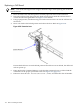
1. Position the fan assembly in the chassis.
2. Tighten the two thumb screws to secure the fan to the chassis.
3. Check the fan status LED. It should be GREEN. See Table 6-1 for LED definitions.
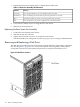
Removing and Replacing the Rear Smart Fan Assembly
The rear smart fan assembly is located in the rear of the chassis. The fan assembly is a hot-swap
component. See “Hot-Swap FRUs” (page 101) for a list and description of hot-swap FRUs.
112 Removal and Replacement