
User Service Guide, Fifth Edition - HP 9000 rp4410/4440


If you are installing fewer than the maximum number of dual processor modules, the modules
must be installed in the appropriate connectors. See Table 3-7.
Processor Load Order
You can install up to four dual processor modules on the processor extender board, which is
located under the front cover in the top service bay, directly under the memory extender board.
If you are installing fewer than the maximum number of dual processor modules (one in the
rp4410 server or fewer than four in the rp4440 server), they must be installed in the designated
locations on the processor extender board.
The connectors (slots or sockets) on the processor extender board are labeled CPU0 through
CPU3. CPU0 and CPU1 connectors are located on the top of the processor extender board, and
CPU2 and CPU3 connectors are located on the bottom.
Table 3-7 lists the load sequence.
Table 3-7 Dual Processor Module Load Order
ConnectorDual Processor ModuleServer
CPU01rp4410 or rp4440
CPU12rp4410 or rp4440
CPU23rp4440 only
CPU34rp4440 only
Removing the Processor Extender Board
WARNING! Ensure that the system is powered off and all power sources have been disconnected
from the server before removing the processor extender board.
Voltages are present at various locations within the server whenever an AC power source is
connected. This voltage is present even when the main power switch is in the off position.
Failure to observe this warning can result in personal injury or damage to equipment.
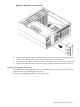
To remove the processor extender board, follow these steps:
1. If rack-mounted, slide the server out from the rack until it stops. (See “Extend the Server
from the Rack” (page 58).)
2. Remove the front bezel. (See “Removing the Front Bezel” (page 63).)
3. Remove the front cover. (See “Removing the Front Cover” (page 64).)
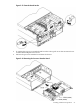
4. Press the latch on each extraction lever located on each side of the processor extender board.
78 Installing the System