
User Service Guide, Fifth Edition - HP 9000 rp4410/4440


System Battery
This section provides information on the system battery and how to replace a system battery.
Battery Notice
This product contains a Lithium battery.
WARNING! Lithium batteries can explode if mistreated. Do not recharge, disassemble, or
dispose of lithium batteries in a fire. Failure to observe this warning can result in personal injury
or damage to equipment.
Replace with the identical or equivalent battery. Follow the manufacturer’s recommendations.
Dispose of used batteries according to the manufacturer's instructions.
Replacing the System Battery
CAUTION: Before replacing the system battery, record all boot configuration settings listed by
the BCH INFO ALL command. You must reset these values after replacing a battery.
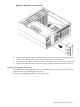
To remove and replace the system battery, follow these steps:
1. If rack-mounted, slide the server out from the rack until it stops. See “Extend the Server
from the Rack” (page 58).
2. Remove the top cover from the chassis. See “Removing the Top Cover” (page 65).
3. Remove the I/O baseboard assembly from the chassis. See “Removing the I/O Baseboard
Assembly” (page 69).
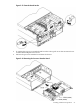
4. Locate the system battery on the I/O baseboard.
72 Installing the System