
User Service Guide, Fifth Edition - HP 9000 rp4410/4440
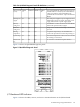
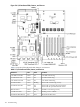
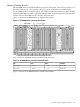
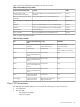
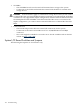
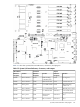
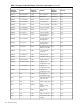

Table 5-4 QuickFind Diagnostic Panel LED Definitions (continued)
DetailsLED 3LED 2LED 1LED 0Item
The specified DIMM has failed and must be replaced.
If all the LEDs for a rank (0-7) are lit and the memory
config error LED is lit, then the DIMMs in the
specified rank are mismatched—replace mismatched
DIMM
DIMM
xD
DIMM xCDIMM xBDIMM
xA
Memory bank
X (0-7)
One of the power supplies or power supply fans have
failed. Replace the power supply. The faulty power
supply LED (located on power supply) lights
n/an/an/aCheck power
supply
The DIMMs in a rank are mismatched. All the DIMM
LEDs in the specified rank (0-7) light.
n/an/an/aMemory
config error
The processors are mismatched. Replace mismatched
processor.
n/an/an/aProcessor
config error
A required component(s) is not installed in the
system. This prevents the server from powering on.
n/an/an/aMissing
component
The internal temperature of the server has exceeded
the warning or critical level.
n/an/an/aSystem temp
An event has occurred that requires attention.n/an/an/aCheck event
log
Figure 5-3 shows the QuickFind diagnostic panel.
Figure 5-3 QuickFind Diagnostic Panel
I/O Baseboard LED Indicators
Figure 5-4 shows the LEDs, sensors, and reset or attention buttons on the I/O baseboard.
Troubleshooting Using LED Indicators 141