
User Service Guide, Fifth Edition - HP 9000 rp4410/4440
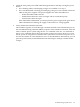
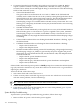
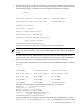
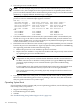

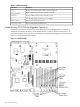
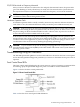


Table 5-3 Front Control Panel LED Definitions
DescriptionColorFlash RateStateLED/Button
System normal. OS up and running.GreenSteadyRunningSystem LED
OS booting or at BCH.GreenFlashing at 0.5
Hz
BootingSystem LED
Warning. System needs attention. Redundancy
lost, component failure pending. (Additional
information can be found in the System Log).
YellowFlashing at 1 HzAttentionSystem LED
Hard fault, system halted.RedFlashing at 2 HzFaultSystem LED
System off.N/AOffOffSystem LED
Power normal.GreenSteadyOnPower LED
Housekeeping voltage present.YellowFlashing at 1 HzOnPower LED
Power off.OffOffOffPower LED
Disk activity.GreenFlashing at rate
of disk activity
ActiveDisk LED
Thermal OK.GreenSteadyOKThermal LED
Thermal warning.YellowFlashing at 1 HzWarningThermal LED
System locator LED can be remotely or locally
activated/deactivated.
BlueFlashing at 1 HzActiveLocator
LED/button
QuickFind Diagnostic Panel LEDs
The QuickFind diagnostic panel is located under the top cover and is attached to the top of the
power supply cage. The following definitions describe the status of the various LEDs and what
is wrong with the indicated component.
NOTE: LED behavior is based on firmware. For changes in LED behavior, see your server
firmware release notes.
Table 5-4 lists the QuickFind diagnostic panel LED definitions.
Table 5-4 QuickFind Diagnostic Panel LED Definitions
DetailsLED 3LED 2LED 1LED 0Item
If the System LED (on front panel) is in the attention
or fault state and the processor LED is on, then the
processor or voltage regulator has failed and the
processor module in the specified socket needs to be
replaced. If the thermal LED is in the warning or
critical state and the processor LED is on, then the
processor exceeded the warning or critical level
Socket 3Socket 2Socket 1Socket 0Processor
A soldered voltage regulator has failed and the
specified board must be replaced
n/aI/O boardMemory
board
CPU
board
Subsystem
n/an/an/an/an/aI/O VRM
n/an/an/an/an/aCPU VRM
One or both fans in a fan module have failed and the
module must be replaced. Fan 2 is in front of the
power supplies
n/a210Fan module
140 Troubleshooting