
User Service Guide, Fifth Edition - HP 9000 rp4410/4440


Accessing the iLO MP Interface and System Logs
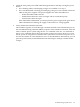
To access the iLO MP interface and system logs, follow these steps:
1. To access the MP interface, press Ctrl+B.
2. Log in with proper user name and password.
3. To display the console logs, enter cl. The console log displays console history from oldest
to newest.
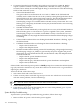
4. To display the system logs, enter sl. The system logs consist of the following:
• SEL
• Forward progress log
• Current boot log
• Previous boot log
• Live events log
SEL
To access the SEL, follow these steps:
1. Access the iLO MP command prompt.
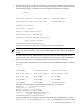
2. Enter the sl command. The Event Log Viewer menu displays the following:
SL
Event Log Viewer Menu:
Log Name Entries % Full Latest Timestamped Entry
-------------------------------------------------------------------
E - System Event 39 3 % 01 Nov 2004 17:15:03
F - Forward Progress 1307 32 %
B - Current Boot 299 99 %
P - Previous Boot 0
C - Clear All Logs
L - Live Events
Enter menu item or [Ctrl-B] to Quit:
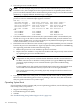
3. To review events, enter e. The Event Log Navigation menu appears:
Log Name Entries % Full Latest Timestamped Entry
-------------------------------------------------------------------
E - System Event 39 3 % 01 Nov 2004 17:15:03
Event Log Navigation Help:
+ View next block (forward in time, e.g. from 3 to 4)
- View previous block (backward in time, e.g. from 3 to 2)
<CR> Continue to the next or previous block
D Dump the entire log for capture and analysis
F First entry
L Last entry
J Jump to entry number
H View mode configuration - hex
K View mode configuration - keyword
T View mode configuration - text
A Alert Level Filter options
U Alert Level Unfiltered
? Display this Help menu
Q Quit and return to the Event Log Viewer Menu
Ctrl-B Exit command and return to the MP Main Menu
4. To select text mode , enter t.
5. To dump the log to the screen, enter d (if desired, save this file for reference).
136 Troubleshooting