
User Service Guide, Fifth Edition - HP 9000 rp4410/4440
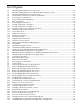



3-30 Removing the Memory Extender Board.......................................................................................87
3-31 Inserting DIMM Into the Extender Board Connector Socket........................................................88
3-32 Slot ID Numbering........................................................................................................................90
3-33 PCI/PCI-X OLX Divider Layout....................................................................................................92
3-34 Inserting a PCI/PCI-X Card...........................................................................................................93
3-35 Slider Gate Latch...........................................................................................................................94
3-36 Removing the SCSI Jumper Cable.................................................................................................98
3-37 Installing the Duplex Board..........................................................................................................99
3-38 Installing the SCSI Cable B to the SCSI Backplane......................................................................100
3-39 Installing the SCSI Cable B to the SCSI Adapter Board..............................................................101
3-40 Ports on Server Rear....................................................................................................................104
3-41 iLO MP Setup Flowchart.............................................................................................................106
3-42 Web Login Page...........................................................................................................................113
3-43 Status Summary Page..................................................................................................................113
3-44 Front Control Panel LEDs............................................................................................................122
3-45 QuickFind Diagnostic Panel........................................................................................................124
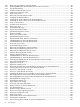
5-1 PCI/PCI-X LEDs...........................................................................................................................138
5-2 Front Control Panel LEDs............................................................................................................139
5-3 QuickFind Diagnostic Panel........................................................................................................141
5-4 I/O Baseboard LEDs, Buttons, and Sensors.................................................................................142
5-5 32-DIMM Memory Extender Board LEDs...................................................................................143
5-6 16-DIMM Memory Extender Board LEDs...................................................................................144
6-1 Accessing T-25 Screws.................................................................................................................150
6-2 Pedestal-Mounted Server............................................................................................................151
6-3 Removing and Replacing the Front Bezel...................................................................................152
6-4 Removing and Replacing the Front Cover..................................................................................153
6-5 Removing and Replacing the Top Cover.....................................................................................154
6-6 Memory Extender Board Latches................................................................................................155
6-7 Memory Extender Board.............................................................................................................156
6-8 16-DIMM Memory Extender Board Slot IDs...............................................................................158
6-9 32-DIMM Memory Extender Board Slot IDs...............................................................................159
6-10 Inserting the DIMM into the Extender Board Connector Socket................................................160
6-11 Processor Extender Board............................................................................................................162
6-12 Dipswitch Location......................................................................................................................163
6-13 Dipswitch Setting for S5..............................................................................................................164
6-14 Removing the Dual Processor Module from the Processor Extender Board..............................167
6-15 Locating the Socket in the Processor Extender Board.................................................................168
6-16 Processor Cable Placed Correctly................................................................................................169
6-17 Processor Cable Placed Incorrectly.............................................................................................170
6-18 Installing the Dual Processor Module on the Processor Extender Board...................................171
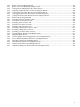
6-19 Hot-Swappable I/O Chassis Fans Removal and Replacement....................................................173
6-20 Hot-Swappable Power Supply Chassis Fan Removal and Replacement....................................174
6-21 I/O Baseboard Locking Lever......................................................................................................176
6-22 I/O Baseboard Removal...............................................................................................................177
6-23 S5102 Dipswitch Setting..............................................................................................................178
6-24 Accessing the S5102 Dipswitch...................................................................................................178
6-25 Battery Location on the I/O Baseboard........................................................................................181
6-26 Slot ID Numbering......................................................................................................................183
6-27 PCI/PCI-X OLX Divider Layout..................................................................................................186
6-28 PCI-X Card Latch Opening Sequence.........................................................................................186
6-29 Inserting a PCI/PCI-X Card.........................................................................................................187
6-30 Slider Gate Latch.........................................................................................................................188
6-31 OLX Divider Removal and Replacement....................................................................................192
6-32 OLX Slider Gate Bracket..............................................................................................................193
6-33 Disconnecting SCSI Cable B from the SCSI Backplane...............................................................196
12 List of Figures