
Rack to Tower and Tower to Rack System Conversion Guide, Second Edition - HP 9000 rp3410 and HP 9000 rp3440



Converting a Tower System to a Rack System
Process for Converting Your Tower System to a Rack System
Chapter 4
25
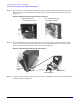
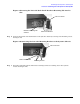
Figure 4-8Inserting the Left-side Rack Latch Bracket’s Retaining Tab into Its
Slot
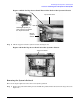
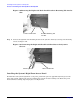
Step 2. Connect the left-side rack latch bracket to the system’s chassis by screwing in its mounting screws.
See Figure 4-9.
Figure 4-9Connecting the Left-side Mounting Bracket to the System’s Chassis
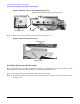
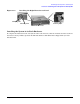
Step 3. Insert the right-side rack latch bracket’s retaining tab into its retaining slot on the system’s
chassis. See Figure 4-10.
Left Front Panel
Bracket’s Retaining Tab
and Slot
Rack Latch Bracket
Left Front Panel
Rack Latch Bracket
Mounting Screws