
Rack to Tower and Tower to Rack System Conversion Guide, Second Edition - HP 9000 rp3410 and HP 9000 rp3440



Converting a Tower System to a Rack System
Process for Converting Your Tower System to a Rack System
Chapter 4
23
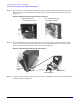
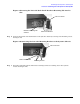
Figure 4-4Slide the Top Access Panel Toward the Back of the System’s Chassis
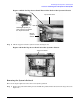
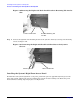
Step 6. Lift the top panel off of the system’s chassis. See Figure 4-5.
Figure 4-5Lift the Top Access Panel off of the System’s Chassis
Removing the System’s Pedestal
Here are the steps required to remove the tower system’s pedestal:
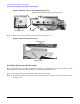
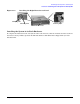
Step 1. Remove the pedestal mounting screws and slide the pedestal in the direction of the large arrow. See
Figure 4-6.
Back of
system’s
chassis
Top Access Panel
Retaining Snap that you
have to press in to release
the Top Access Panel
Top Access Panel