
Rack to Tower and Tower to Rack System Conversion Guide, Second Edition - HP 9000 rp3410 and HP 9000 rp3440


Chapter 3
Converting a Rack System to a Tower System
Process for Converting Your Rack System to a Tower System
18
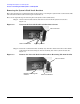
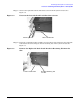
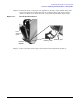
Step 2. Place the top access panel on the system’s chassis, press downward and slide the top
panel toward the front of the system until it snaps into place. See Figure 3-9. Ensure
that all hooks are in place.
Figure 3-9 Slide the Top Access Panel onto the System’s Chassis
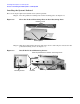
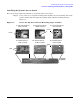
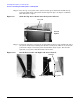
Step 3. Position the left-side access panel at an approximate 45 degree angle with the left side of
the system and insert its retaining slots on their retaining tabs, which are located on the
pedestal. See Figure 3-10. Rotate panel inward until it snaps in place. Note that the
right-side access panel is installed in this same manner.
Figure 3-10 Install the Left-side and Right-side Access Panels
Top Panel
Front of
System
Retaining Slots
Retaining Tabs
Pedestal