
Rack to Tower and Tower to Rack System Conversion Guide, Second Edition - HP 9000 rp3410 and HP 9000 rp3440


Chapter 3
13
3 Converting a Rack System to a Tower
System
This chapter explains how to convert your hp 9000 rp3410 and rp3440 rack system to a tower system.
Process for Converting Your Rack System to a Tower
System
This section covers the sequence of procedures necessary for converting your rack system to a tower system.
Here is a high-level summary of these steps:
1. Removing the system from its rack enclosure
2. Removing the system’s rack latch brackets
3. Installing the system’s pedestal
4. Installing the system’s access panels
Removing the System from its Rack Enclosure
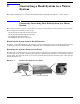
To remove a rack system from its rack enclosure, reverse the instructions in the document Installation Guide
for Midweight Slide Kit (HP Part Number: 5064-9640) that was shipped with your rack installation kit.
Removing the System’s Front Access Panel
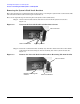
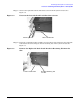
To remove the rack system’s front access panel, press in on the front access panel’s retaining clips (located on
the right side of the system) and rotate the front panel approximately 45 degrees away from the system’s
chassis. Next, disconnect the front access panel’s retaining slots from their retaining tabs on the system’s
chassis. See Figure 3-1.
Figure 3-1 Remove the Front Access Panel
Front Access Panel
Retaining Tabs
Retaining Slots
Retaining Clips