
Internal Cabling Guide for HP Smart Array Controllers

Cabling for the HP Integrity rx7620 Server
Installing the HP Smart Array 6402 or 6404 Controller Card
Chapter 2
12
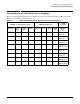
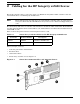
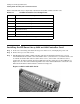
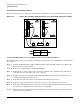
Table 2-2 identifies the major components of the Smart Array 6402 or 6404 controller card.
Installing the HP Smart Array 6402 or 6404 Controller Card
Step 1. If the server is running, shut down the OS, power off the server, and unplug the power cord.
Step 2. Remove the top cover of the server.
Step 3. The HP Smart Array 6402 or 6404 controller card must be installed in PCI slot 0-8 or 1-7 for
internal RAID (the Procurium card is embedded in slot 1-8, and slot 0-1 if a second Procurium card
is ordered). If another PCI card is located in slot 0-8 or 1-7, remove that card and relocate it to
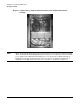
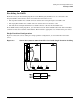
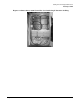
another slot. Do this by twisting the blue paddle that locks the card in place by the bulkhead (see
Figure 2-2). Once the card is unlatched, pull the tabs on the insulator/dividers to unseat the card.
Then insert the 6402 or 6404 controller card into the empty slot.
Figure 2-2 PCI Card Paddle Locks
Table 2-2 SA 6402 Controller Card Components
Item ID Description
1 Internal SCSI connector, port A1*
2 Internal SCSI connector, port A2*
3 External SCSI connector, port A1*
4 External SCSI connector, port A2*
5 Controller battery
6 Battery-backed cache module
7 Connector for expansion board
* NOTE: Do not use both connectors on a port simultaneously.