
Installation Guide, Seventh Edition - HP 9000 rp3410 and HP 9000 rp3440





Installing the System
Troubleshooting
Chapter 1
89
Troubleshooting Using LEDs
If you suspect a hardware failure during installation, the power and system LEDs, located on the front control
panel, will help you identify the problem. The following sections describe their functions. You may want to
back up your data or replace a component before it fails.
The boot process will be monitored by the iLO MP. With the current ILO MP functionality, the four diagnostic
LEDs are disabled (always off). You can monitor server operation from a console using the iLO MP.
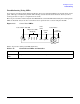
Figure 1-57 Control Panel LEDs
Table 1-15 provides control panel LED information.
Table 1-15 Control Panel LEDs and Switches
Name Function
Power on/off
LED
The green on/off LED is illuminated when the power is on.
1 2 3 4 LAN System
System
LED
Power
On/Off LED
Power Button
Diagnostics LEDs
(Disabled)
Locator Button and LED
LAN
LED