
Installation Guide, Seventh Edition - HP 9000 rp3410 and HP 9000 rp3440



Figures
7
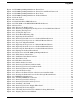
Figure 1-1. HP 9000 rp3410/rp3440 Server (Front View) . . . . . . . . . . . . . . . . . . . . . . . . . . . . . . . . . 14
Figure 1-2. HP 9000 rp3410/rp3440 Server (Front View with Bezel Removed) . . . . . . . . . . . . . . . . 14
Figure 1-3. HP 9000 rp3410/rp3440 Server (Rear View) . . . . . . . . . . . . . . . . . . . . . . . . . . . . . . . . . . 14
Figure 1-4. HP 9000 rp3410/rp3440 Server (Pedestal Mount) . . . . . . . . . . . . . . . . . . . . . . . . . . . . . 15
Figure 1-5. Front View. . . . . . . . . . . . . . . . . . . . . . . . . . . . . . . . . . . . . . . . . . . . . . . . . . . . . . . . . . . . . 18
Figure 1-6. Control Panel. . . . . . . . . . . . . . . . . . . . . . . . . . . . . . . . . . . . . . . . . . . . . . . . . . . . . . . . . . . 19
Figure 1-7. Hard Disk Drive LED Indicators . . . . . . . . . . . . . . . . . . . . . . . . . . . . . . . . . . . . . . . . . . . 19
Figure 1-8. DVD–ROM or CD-RW/DVD-ROM LED Indicators. . . . . . . . . . . . . . . . . . . . . . . . . . . . . 20
Figure 1-9. Rear View . . . . . . . . . . . . . . . . . . . . . . . . . . . . . . . . . . . . . . . . . . . . . . . . . . . . . . . . . . . . . 21
Figure 1-10. Release the Rack Latches . . . . . . . . . . . . . . . . . . . . . . . . . . . . . . . . . . . . . . . . . . . . . . . 26
Figure 1-11. Removing and Replacing the Top Cover on a Rack-Mounted Server . . . . . . . . . . . . . 27
Figure 1-12. Aligning the Top Cover . . . . . . . . . . . . . . . . . . . . . . . . . . . . . . . . . . . . . . . . . . . . . . . . . 27
Figure 1-13. Closing the Top Cover . . . . . . . . . . . . . . . . . . . . . . . . . . . . . . . . . . . . . . . . . . . . . . . . . . 28
Figure 1-14. Front Bezel Retaining Clip . . . . . . . . . . . . . . . . . . . . . . . . . . . . . . . . . . . . . . . . . . . . . . 28
Figure 1-15. Replacing the Front Bezel . . . . . . . . . . . . . . . . . . . . . . . . . . . . . . . . . . . . . . . . . . . . . . . 29
Figure 1-16. Removing the Side Cover on a Pedestal-Mounted Server . . . . . . . . . . . . . . . . . . . . . . 30
Figure 1-17. Removing the Top Cover on a Pedestal-Mounted Server. . . . . . . . . . . . . . . . . . . . . . . 31
Figure 1-18. Top Cover Alignment Mark . . . . . . . . . . . . . . . . . . . . . . . . . . . . . . . . . . . . . . . . . . . . . . 32
Figure 1-19. Replacing the Top Cover on a Pedestal-Mounted Server. . . . . . . . . . . . . . . . . . . . . . . 32
Figure 1-20. Replacing the Side Cover on a Pedestal-Mounted Server . . . . . . . . . . . . . . . . . . . . . . 33
Figure 1-21. Removing the Front Bezel on a Pedestal-Mounted Server . . . . . . . . . . . . . . . . . . . . . . 34
Figure 1-22. Aligning the Pedestal Front Bezel . . . . . . . . . . . . . . . . . . . . . . . . . . . . . . . . . . . . . . . . . 35
Figure 1-23. Front View of the HP 9000 rp3410/rp3440 Server . . . . . . . . . . . . . . . . . . . . . . . . . . . . 36
Figure 1-24. Filler Removal from Slot 1. . . . . . . . . . . . . . . . . . . . . . . . . . . . . . . . . . . . . . . . . . . . . . . 37
Figure 1-25. Disk Drive Installation in Slot 3 . . . . . . . . . . . . . . . . . . . . . . . . . . . . . . . . . . . . . . . . . . 37
Figure 1-26. Hard Drive Lock. . . . . . . . . . . . . . . . . . . . . . . . . . . . . . . . . . . . . . . . . . . . . . . . . . . . . . . 38
Figure 1-27. DVD Drive Installation. . . . . . . . . . . . . . . . . . . . . . . . . . . . . . . . . . . . . . . . . . . . . . . . . . 39
Figure 1-28. Airflow Guides Locations . . . . . . . . . . . . . . . . . . . . . . . . . . . . . . . . . . . . . . . . . . . . . . . . 41
Figure 1-29. Removing the Memory Airflow Guide. . . . . . . . . . . . . . . . . . . . . . . . . . . . . . . . . . . . . . 41
Figure 1-30. Removing the Processor Airflow Guide . . . . . . . . . . . . . . . . . . . . . . . . . . . . . . . . . . . . 42
Figure 1-31. Removing Fans 1A and 1B. . . . . . . . . . . . . . . . . . . . . . . . . . . . . . . . . . . . . . . . . . . . . . . 43
Figure 1-32. Open the Release Clip . . . . . . . . . . . . . . . . . . . . . . . . . . . . . . . . . . . . . . . . . . . . . . . . . . 44
Figure 1-33. Remove the Front Portion of the Processor Airflow Guide . . . . . . . . . . . . . . . . . . . . . 44
Figure 1-34. Routing the Turbofan Power Cables through Heatsink Posts. . . . . . . . . . . . . . . . . . . 45
Figure 1-35. DIMM Slot Identification . . . . . . . . . . . . . . . . . . . . . . . . . . . . . . . . . . . . . . . . . . . . . . . . 47
Figure 1-36. Inserting DIMM into Connector . . . . . . . . . . . . . . . . . . . . . . . . . . . . . . . . . . . . . . . . . . 50
Figure 1-37. Removing the PCI Card Cage . . . . . . . . . . . . . . . . . . . . . . . . . . . . . . . . . . . . . . . . . . . . 51
Figure 1-38. Removing the PCI Card Cage Cover. . . . . . . . . . . . . . . . . . . . . . . . . . . . . . . . . . . . . . . 52
Figure 1-39. Installing a PCI Card. . . . . . . . . . . . . . . . . . . . . . . . . . . . . . . . . . . . . . . . . . . . . . . . . . . 53
Figure 1-40. Removing the Power Supply Filler Panel . . . . . . . . . . . . . . . . . . . . . . . . . . . . . . . . . . . 54
Figure 1-41. Replacing the Power Supply . . . . . . . . . . . . . . . . . . . . . . . . . . . . . . . . . . . . . . . . . . . . . 55
Figure 1-42. Unlocking the Dual Processor Module Locking Mechanism . . . . . . . . . . . . . . . . . . . . 56
Figure 1-43. Aligning the Processor Module . . . . . . . . . . . . . . . . . . . . . . . . . . . . . . . . . . . . . . . . . . . 57