
Installation Guide, Seventh Edition - HP 9000 rp3410 and HP 9000 rp3440

Installing the System
Installing Additional Components
Chapter 1
44
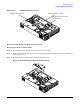
Figure 1-32 Open the Release Clip
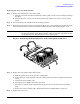
Step 9. Disconnect the power cable connected to the guide from the system board by squeezing the clips.
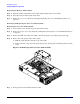
Step 10. Lift the front portion of the processor airflow guide out of the server.
Figure 1-33 Remove the Front Portion of the Processor Airflow Guide