
Installation Guide, Seventh Edition - HP 9000 rp3410 and HP 9000 rp3440

Installing the System
Installing Additional Components
Chapter 1
43
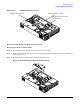
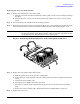
Figure 1-31 Removing Fans 1A and 1B
Step 6. Grasp system fan 1B and lift it from its socket (Figure 1-31).
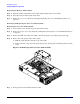
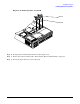
Step 7. Remove the memory airflow guide. “Removing the Memory Airflow Guide” on page 41
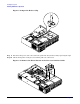
Step 8. Rotate the clip clockwise to release the latch.
Fan 1A
Fan 1B