
Installation Guide, Seventh Edition - HP 9000 rp3410 and HP 9000 rp3440


Installing the System
Installing Additional Components
Chapter 1
34
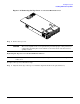
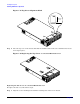
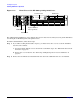
Figure 1-21 Removing the Front Bezel on a Pedestal-Mounted Server
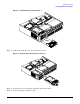
Step 2. Lift the bezel off the mounting tabs and away from the chassis.
Replacing the Front Bezel on a Pedestal-Mounted Server
To replace the front bezel parts, follow these steps:
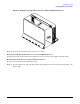
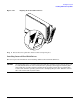
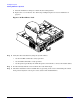
Step 1. Position the bezel at an approximate 45 degree angle and align the retaining slots at the bottom
with the retaining tabs on the chassis. Press the bezel against the chassis to engage the tabs.