
Installation Guide, Seventh Edition - HP 9000 rp3410 and HP 9000 rp3440



10
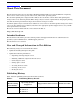
Document Organization
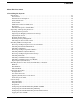
This guide is divided into the following sections.
Section 1 Introduction: Provides views and descriptions of the server and safety information.
Section 2 Unpacking and Inspecting the Server: Provides procedures to perform before installing
the server.
Section 3 Installing Additional Components: Describes how to install server components that are
not installed before delivery.
Section 4 Installing the Server into a Rack: Describes how to install the server into an HP rack,
non-HP rack, or pedestal.
Section 5 Connecting Cables: Describes the cables to connect to power the server and to provide
LAN connectivity.
Section 6 Console Setup: Describes how to set up and start a console session on the server.
Section 7 Accessing a Host Console: Describes the different ways to access the host console.
Section 8 Powering On the Server: Provides instructions on how to power on the server.
Section 9 Booting the Operating System: Provides instructions on how to boot the operating
system.
Section 10 Troubleshooting: Diagnostics and basic troubleshooting information.
Typographic Conventions
This document uses the following conventions.
WARNING A warning lists requirements that you must meet to avoid personal injury.
CAUTION A caution provides information required to avoid losing data or avoid losing system
functionality.
IMPORTANT Important messages provide essential information to explain a concept or to complete a task.
NOTE A note highlights useful information such as restrictions, recommendations, or important
details about HP product features.
A7137-96001 HP-UX 11i v1 HP 9000 rp3410 and rp3440 April 2005
N/A HP-UX 11i v1 HP 9000 rp3410 and rp3440 July 2004
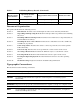
Table 1 Publishing History Details (Continued)
Document
Manufacturing
Part Number
Operating Systems
Supported
Supported Product Versions Publication Date