
Switch 7700 Configuration Guide, v2

80 CHAPTER 5: ROUTING PROTOCOL OPERATION
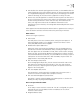
By default, OSPF is not enabled.
Enter OSPF Area View
Perform the following configurations in OSPF view.
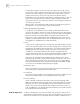
Specify Interface
OSPF divides the AS into different areas. You must configure each OSPF interface
to belong to a particular area, identified by an area ID. The areas transfer routing
information between them through the ABRs.
In addition, parameters of all the routers in the same area should be identical.
Therefore, when configuring the routers in the same area, please note that most
configurations should be based on the area. An incorrect configuration can disable
the neighboring routers from transmitting information, and lead to congestion or
self-loop of the routing information.
Perform the following configuration in OSPF Area view.
You must specify the segment to which the OSPF will be applied after enabling the
OSPF tasks.
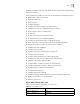
Configure Router ID
A router ID is a 32-bit unsigned integer that uniquely identifies a router within an
AS. A router ID can be configured manually. If a router ID is not configured, the
system selects the IP address of an interface automatically. When you set a router
ID manually, you must guarantee that the IDs of any two routers in the AS are
unique. A common undertaking is to make the router ID the same as the IP
address of an interface on the router.
Perform the following configurations in system view.
To ensure the stability of OSPF, the you must determine the division of router IDs
and manually configure them when implementing network planning.
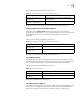
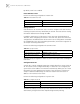
Tab le 23 Enter OSPF Area View
Operation Command
Enter an OSPF area view area area-id
Delete a designated OSPF area undo area area-id
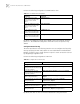
Tab le 24 Specify Interface
Operation Command
Specify an interface to run OSPF network ip-address ip-mask
Disable OSPF on the interface undo network ip-address ip-mask
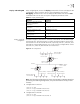
Tab le 25 Configure Router ID
Operation Command
Configure router ID router id router-id
Remove the router ID undo router id