
Switch 7700 Configuration Guide, v2

RIP 69
Perform the following configurations in RIP view.
Note that after the RIP task is enabled, you should also specify its operating
network segment, for RIP only operates on the interface on the specified network.
For an interface that is not on the specified network, RIP does not receive or send
routes on it, and does not forwards its interface route. The network-address
parameter is the address of the enabled or disabled network, and it can also be
configured as the IP network address of the appropriate interfaces.
When a network command is used for an address, the effect is to enable the
interface of the network with this address. For example, for network
129.102.1.1, you can see network 129.102.0.0 using either the display
current-configuration command or the display rip command.
By default, RIP is disabled on all the interfaces after the router boots.
Configure Unicast RIP Messages
RIP is a broadcast protocol, and to exchange route information with the
non-broadcast network, the unicast transmission mode must be adopted.
Please perform the following configuration in the RIP view.
By default, RIP does not send any message to any unicast address.
Usually, this command is not recommended because the opposite side does not
need to receive two of the same messages at a time. It should be noted that the
peer command should also be restricted by rip work, rip output, rip input and
network commands.
Specify the RIP Version
RIP has two versions, RIP-1 and RIP-2. You can specify the version of the RIP packet
processed by the interface.
RIP-1 broadcasts the packets. RIP-2 can transmit packets by both broadcast and
multicast. By default, multicast is adopted for transmitting packets. In RIP-2, the
default multicast address is 224.0.0.9. The advantage of transmitting packets in
the multicast mode is that the hosts in the same network that do not run RIP do
not receive RIP broadcast packets. In addition, this mode prevents hosts running
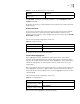
Table 7 Enable RIP Interface
Operation Command
Enable RIP on the specified network
interface
network network-address
Disable RIP on the specified
network interface
undo network network-address
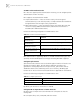
Table 8 Configure Unicast RIP Messages
Operation Command
Configure unicast RIP
messages
peer ip-address
Cancel unicast RIP messages undo peer ip-address