
Switch 7700 Configuration Guide, v2

68 CHAPTER 5: ROUTING PROTOCOL OPERATION
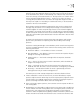
validity of the routes. With these mechanisms, RIP, an interior routing protocol,
enables the router to learn the routing information of the entire network.
RIP has become one of the most popular standards of transmitting router and host
routes. It can be used in most campus networks and t regional networks that are
simple, yet extensive. For larger and more complicated networks, RIP is not
recommended.
Configuring RIP Only after RIP is enabled can other functional features be configured. But the
configuration of the interface-related functional features is not dependent on
whether RIP has been enabled. It should be noted, however, that after RIP is
disabled, the interface-related features also become invalid.
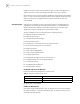
The RIP configuration tasks are described in the following sections:
■ Enable RIP and Enter the RIP View
■ Enable the RIP Interface
■ Configure Unicast RIP Messages
■ Specify the RIP Version
■ Configure RIP-1 Zero Field Check of the Interface Packet
■ Specify the Operating State of the Interface
■ Disable Host Route
■ Set RIP-2 Route Aggregation
■ Set RIP-2 Packet Authentication
■ Configure Split Horizon
■ Configure RIP to Import Routes of Other Protocols
■ Configure Default Cost for the Imported Route
■ Set the RIP Preference
■ Set Additional Routing Metric
■ Configure Route Filtering
Enable RIP and Enter the RIP View
Perform the following configurations in system view.
By default, RIP is not enabled.
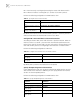
Enable the RIP Interface
For flexible control of RIP operation, you can specify the interface and configure
the network where it is located to the RIP network, so that these interfaces can
send and receive RIP packets.
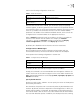
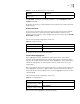
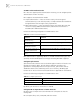
Tab le 6 Enable RIP and Enter the RIP View
Operation Command
Enable RIP and enter the RIP view rip
Disable RIP undo rip