
Switch 7700 Configuration Guide, v2

Static Routes 65
Perform the following configurations in system view.
By default the value is 60
Display and Debug
Static Route
After you configure static and default routes, execute the display command in all
views to display the running of the static route configuration, and to verify the
effect of the configuration.
Example: Typical Static
Route Configuration
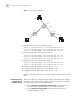
As shown in the Figure 3, the masks of all the IP addresses in the figure are
255.255.255.0. All the hosts or switches must be interconnected in pairs by
configuring static routes.
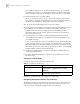
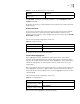
Table 4 Configure the Default Preference of Static Routes
Operation Command
Configure the default preference value of
static routes
ip route-static default-preference
default-preference-value
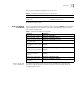
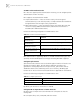
Table 5 Display and Debug the Routing Table
Operation Command
View routing table summary display ip routing-table
View routing table details display ip routing-table verbose
View the detailed information
of a specific route
display ip routing-table ip-address
view the route filtered through
specified basic access control
list (ACL)
display ip routing-table acl { acl-number | acl-name } [
verbose ]
view the route information
that through specified ip prefix
list
display ip routing-table ip-prefix ip-prefix-number [
verbose ]
View the routing information
found by the specified
protocol
display ip routing-table protocol protocol [ inactive |
verbose ]
View the tree routing table display ip routing-table radix
view the integrated routing
information
display ip routing-table statistics