
Switch 7700 Configuration Guide, v2

Link Aggregation Configuration 35
Ethernet Port
Troubleshooting
If the default VLAN ID configuration fails, take the following steps:
1 Execute the display interface or display port command to check if the port is a
trunk port or a hybrid port. If it is neither of them, configure it as a trunk port or a
hybrid port.
2 Then configure the default VLAN ID.
Link Aggregation
Configuration
Link Aggregation means aggregating several ports together to allow
outgoing/incoming payload balance among member ports. Link aggregation
appears as a single port physically.
The Switch 7700 supports 64 link aggregation groups. For the 48-port
10/100BASE-T auto-sensing fast Ethernet interface card, the first 24 ports can be
aggregated arbitrarily as long as they are assigned contiguously; meaning port 1
to port 2 to port 3 and so on. The same is true for the last 24 ports. For the other
interface cards, you can aggregate no more than the ports provided by each card.
The group can start from any port, as long as the ports in it are consecutive order.
In a link aggregation group, the port with the smallest number serves as the
master port, and the others serve as member ports. In one link aggregation group,
the link type of the master port and the member ports must be identical. That is,
the master port and the member ports should be in Trunk mode together, or be in
Access mode together.
Link Aggregation
Configuration
Link aggregation configuration involves aggregating Ethernet ports or removing a
configured link aggregation.
Perform the following configuration in system view.
Note: The Ethernet ports to be aggregated should be configured with the same
speed and duplex otherwise, they cannot be aggregated. The Switch 7700 does
not support ingress aggregation mode.
Display and Debug Link
Aggregation
After the previous configuration, execute the display command in all views to
display the running of the link aggregation configuration, and to verify the effect
of the configuration.
Example: Configuring
Link Aggregation
The following example uses the link aggregation commands to aggregate several
ports and implements the outgoing/incoming payload balance among all the
member ports. The link aggregation is typically used for Trunk ports. Since the
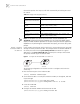
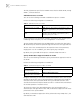
Table 15 Aggregating Ethernet Ports
Operation Command
Aggregate Ethernet ports link-aggregation port_num1 to port_num2 {both | ingress}
Remove a configured link
aggregation
undo link-aggregation {master_port_num | all}
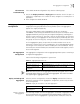
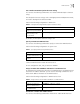
Table 16 Display the Information of the Link Aggregation
Operation Command
Display the information of the
link aggregation
display link-aggregation [master_port_num]