
Switch 7700 Configuration Guide, v2

34 CHAPTER 2: PORT CONFIGURATION
forward the packets. The loop test will finish automatically after being executed
for a while.
Note: The loopback test cannot be performed on the port disabled by the
shutdown command. During the loopback test, the system will disable speed,
duplex, mdi and shutdown operation on the port. Some ports do not support the
loopback test. If performing this command in these ports, you will see the system
prompt.
Example: Configuring
the Default VLAN ID of
the Trunk Port
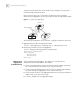
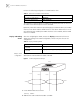
In this example, the Ethernet Switch (Switch A) is connected to the peer (Switch B)
through the trunk port Ethernet1/0/1. This example shows the default VLAN ID for
the trunk port and verifies the port trunk pvid vlan command. As a typical
application of the port trunk pvid vlan command, the trunk port will transmit
the packets without tag to the default VLAN.
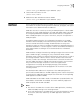
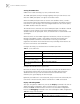
Figure 1 Configure the Default VLAN for a Trunk Port
The following configurations are used for Switch A. Configure Switch B in the
similar way.
1 Enter the Ethernet port view of Ethernet1/0/1.
[SW7700] interface ethernet1/0/1
2 Set the Ethernet1/0/1 as a trunk port and allows VLAN 2, 6 through 50, and 100
to pass through.
[SW7700-Ethernet1/0/1] port link-type trunk
[SW7700-Ethernet1/0/1] port trunk permit vlan 2 6 to 50 100
3 Create the VLAN 100.
[SW7700] vlan 100
4 Configure the default VLAN ID of Ethernet1/0/1 as 100.
[SW7700-Ethernet1/0/1] port trunk pvid vlan 100
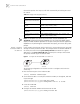
Tab le 14 Display and Debug Ethernet Port
Operation Command
Configure to perform
loopback test on the Ethernet
port.
loopback {external | internal}
Display all the information of
the port
display interface {interface_type | interface_type
interface_num | interface_name}
Display hybrid port or trunk
port
display port {hybrid | trunk}
Display the information of
VLAN VPN
display port vlan-vpn
Clear the statistics information
of the port
reset counters interface [interface_type | interface_type
interface_num | interface_name]
Switch A
Switch B