
Switch 7700 Configuration Guide, v2


NTP 49
Configure Authentication-Enabled NTP Server Mode
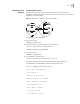
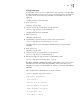
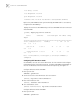
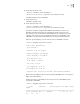
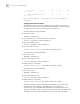
SW77001 sets the local clock as the NTP master clock at stratum 2. SW77002 sets
SW77001 as its time server in server mode and itself in client mode and enables
authentication. See Figure 1-2.
Configure Ethernet Switch SW77001:
1 Enter system view.
<SW77001> system-view
2 Set the local clock as the master NTP clock at stratum 2.
[SW77001] ntp-service refclcok-master 2
Configure Ethernet Switch SW77002:
1 Enter system view.
<SW77002> system-view
2 Set SW77001 as time server.
[SW77002] ntp-service unicast-server 1.0.1.11
3 Enable authentication.
[SW77002] ntp-service authentication enable
4 Set the key.
[SW77002] ntp-service authentication-keyid 42 authentication-mode
md5 aNiceKey
5 Set the key as reliable.
[SW77002] ntp-service reliable authentication-keyid 42
The above examples synchronized SW77002 by SW77001. Since SW77001 has
not been enabled authentication, it cannot synchronize SW77002.
Perform the following additional configurations on SW77001:
1 Enable authentication.
[SW77001] ntp-service authentication enable
2 Set the key.
[SW77001] ntp-service authentication-keyid 42 authentication-mode
md5 aNiceKey
3 Configure the key as reliable.
[SW77001] ntp-service reliable authentication-keyid 42