
Switch 7700 Configuration Guide, v2


NTP 43
NTP Configuration
Examples
Configuring NTP Servers
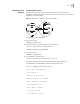
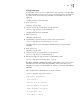
On SW77001, set the local clock as the NTP master clock at stratum 2. On
SW77002, configure SW77001 as the time server in server mode and set the local
equipment as in client mode.
Figure 8 Typical NTP Configuration Networking Diagram
Configure the Switch SW77001:
1 Enter system view.
<SW77001> system-view
2 Set the local clock as the NTP master clock at stratum 2.
[SW77001] ntp-service refclock-master 2
Configure Ethernet Switch SW77002:
1 Enter system view.
<SW77002> system-view
2 Set SW77001 as the NTP server.
[SW77002] ntp-service unicast-server 1.0.1.11
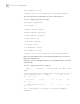
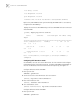
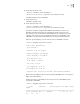
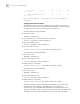
The above examples synchronized SW77002 by SW77001. Before the
synchronization, the SW77002 is shown in the following status:
[SW77002] display ntp-service status
clock status: unsynchronized
clock stratum: 16
reference clock ID: none
nominal frequency: 100.0000 Hz
actual frequency: 100.0000 Hz
clock precision: 2^17
clock offset: 0.0000 ms
root delay: 0.00 ms
root dispersion: 0.00 ms
SW00771
SW00772
SW00770
SW00773
SW00774
SW00775