
Switch 7700 Configuration Guide, v2

40 CHAPTER 11: SYSTEM MANAGEMENT
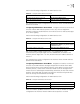
Configuring NTP ID Authentication
Enable NTP authentication, set the MD5 authentication key, and specify the
reliable key. A client will synchronize itself by a server only if the serve can provide
a reliable key.
Perform the following configurations in system view.
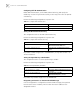
Setting the NTP Authentication Key
This configuration task sets the NTP authentication key.
Perform the following configurations in system view.
Key number number ranges from 1 to 4294967295; the key value contains 1 to
32 ASCII characters.
Setting the Specified Key to Be Reliable
This configuration task is to set the specified key as reliable.
Perform the following configurations in system view.
Key number key-number ranges from 1 to 4294967295
Designating an Interface to Transmit the NTP Message
If the local equipment is configured to transmit all NTP messages, these packets
have the same source IP address, which is taken from the IP address of the
designated interface.
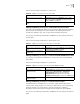
Tab le 71 Configure NTP Authentication
Operation Command
Enable NTP authentication ntp-service authentication enable
Disable NTP authentication undo ntp-service authentication enable
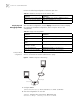
Tab le 72 Configure NTP Authentication Key
Operation Command
Configure NTP authentication key ntp-service authentication-keyid number
authentication-mode md5 value
Remove NTP authentication key undo ntp-service authentication-keyid
number
Tab le 73 Set the Specified Key as Reliable
Operation Command
Set the specified key as reliable ntp-service reliable authentication-keyid
key-number
Cancel the specified reliable key. undo ntp-service reliable
authentication-keyid key-number