
Switch 7700 Configuration Guide, v2

36 CHAPTER 11: SYSTEM MANAGEMENT
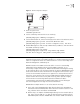
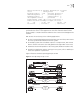
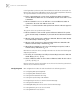
In the figure above, Ethernet Switch A and Ethernet Switch B are connected the
Ethernet port. They have independent system clocks. Before implement automatic
clock synchronization on both switches, we assume that:
■ Before synchronizing the system clocks on Ethernet Switch A and B, the
clock on Ethernet Switch A is set to 10:00:00am, and the clock on B is set to
11:00:00am.
■ Ethernet Switch B serves as an NTP time server and Ethernet Switch A
synchronizes the local clock with the clock of B.
■ It takes 1 second to transmit a data packet from either A or B to the opposite
end.
The system clocks are synchronized as follows:
■ Ethernet Switch A sends an NTP packet to Ethernet Switch B. The packet
carries the timestamp 10:00:00am (T
1
) that tells when it left Ethernet Switch
A.
■ When the NTP packet arrives at Ethernet Switch B, Ethernet Switch B adds
a local timestamp 11:00:01am (T
2
) to it.
■ When the NTP packet leaves Ethernet Switch B, Ethernet Switch B adds
another local timestamp 11:00:02am (T
3
) to it.
■ When Ethernet Switch A receives the acknowledgement packet, it adds a
new timestamp 10:00:03am (T
4
) to it.
Now Ethernet Switch A collects enough information to calculate the following two
important parameters:
■ The delay for a round trip of an NTP packet traveling between the Switch A
and B: Delay= (T
4
-T
1
) - (T
3
-T
2
).
■ Offset of Ethernet Switch A clock relative to Ethernet Switch B clock: offset=
( (T
2
-T
1
) + (T
3
-T
4
) ) /2.
Ethernet Switch A uses this information to set the local clock and to synchronize it
with the clock on Ethernet Switch B.
Configuring NTP NTP configuration includes the tasks described in the following sections:
■ Configuring NTP Operating Mode
■ Configuring NTP ID Authentication
■ Setting the NTP Authentication Key
■ Setting the Specified Key to Be Reliable
■ Designating an Interface to Transmit the NTP Message
■ Setting the NTP Master Clock
■ Enabling/Disabling an Interface to Receive the NTP Message
■ Setting Authority to Access a Local Switch
■ Setting Maximum Local Sessions