
Switch 7700 Configuration Guide, v2

34 CHAPTER 11: SYSTEM MANAGEMENT
Perform the following configuration in Ethernet port view.
Displaying and
Debugging RMON
After the above configuration, execute display command in all views to display
the running of the RMON configuration, and to verify the effect of the
configuration.
Example: RMON
Configuration
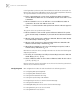
Set an entry in RMON Ethernet statistics table for the Ethernet port performance,
which is convenient for network administrators’ query.
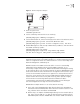
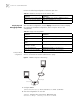
Figure 6 RMON Configuration Networking
1 Configure RMON.
[SW7700-Ethernet2/0/1] rmon statistics 1 owner 3com-rmon
2 View the configurations in user view.
<SW7700> display rmon statistics Ethernet2/0/1
Statistics entry 1 owned by 3com-rmon is VALID.
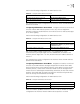
Tab le 63 Add/Delete an Entry to/from the Statistics Table
Operation Command
Add an entry to the statistics table rmon statistics entry-number [ owner text-string ]
Delete an entry from the statistics
table
undo rmon statistics entry-number
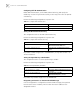
Tab le 64 Display and Debug RMON
Operation Command
Display the RMON statistics display rmon statistics [ port-num ]
Display the history information of
RMON
display rmon history [ port-num ]
Display the alarm information of
RMON
display rmon alarm [ alarm-table-entry ]
Display the extended alarm
information of RMON
display rmon prialarm [ prialarm-table-entry ]
Display the RMON event display rmon event [ event-table-entry ]
Display the event log of RMON display rmon eventlog [ event-number ]
Console port
Network port
Switch
Internet