
Switch 7700 Configuration Guide, v2

RMON 31
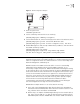
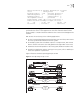
Figure 5 SNMP Configuration Example
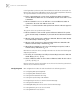
1 Enter the system view.
<SW7700> system-view
2 Set the community name and the access authority.
[SW7700] snmp-agent community read public
3 Set the administrator ID, contact and the physical location of the Ethernet switch.
[SW7700] snmp-agent sys-info contact Mr.Smith-Tel:3306
[SW7700] snmp-agent sys-info location telephone-closet, 3rd-floor
4 Enable SNMP agent to send the trap to NMS whose ip address is 129.102.149.23.
The SNMP community is public.
[SW7700] snmp-agent trap enable
[SW7700] snmp-agent target-host trap address udp-domain
129.102.149.23 udp-port 5000 params securityname public
RMON Remote Network Monitoring (RMON) is a type of IETF-defined MIB. It is the most
important enhancement to the MIB II standard. It is used for monitoring the data
traffic on a segment and even on a whole network. It is one of the widely used
Network Management standards by far.
RMON is based on the SNMP architecture (which is one of its outstanding
advantages) and compatible with the existing SNMP framework, so it is
unnecessary to adjust the protocol. RMON includes NMS and the Agent running
on the network devices. On the network monitor or detector, RMON Agent tracks
and accounts different traffic information on the segment connected to its port,
such as the total number of packets on a segment in a certain period of time or
that of the correct packets sent to a host. ROMN helps the SNMP monitor the
remote network device more actively and effectively, which provides a highly
efficient means for monitoring subnet operations. RMON can reduce
communication traffic between the NMS and the agent, thus facilitating an
effective management over large interconnected networks.
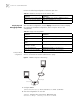
RMON allows multiple monitors. It can collect data in two ways.
■ One is with a special RMON probe. NMS directly obtains the management
information from the RMON probe and controls the network resource. In this
way, it obtains all the information of RMON MIB
■ Another way is to implant the RMON Agent directly into the network devices
(e.g. router, switch, HUB, etc.), so that the devices become network facilities
with RMON probe functions. RMON NMS uses the basic SNMP commands to
NMS
129.102.149.23
129.102.0.1
Ethernet