
Switch 7700 Configuration Guide, v2

30 CHAPTER 11: SYSTEM MANAGEMENT
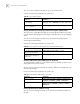
Disabling the SNMP Agent
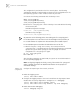
To disable SNMP Agent, please Perform the following configuration in system
view.
If user disable NMP Agent, it will be enabled whatever snmp-agent command is
configured thereafter.
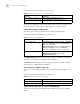
Displaying and
Debugging SNMP
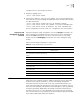
After the above configuration, execute display command to view the SNMP
configuration, and to verify the effect of the configuration. Execute debugging
command in user view to debug SNMP configuration.
Example: SNMP
Configuration
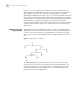
A Network Management Station (NMS) and the Ethernet switch are connected by
the Ethernet. The IP address of NMS is 129.102.149.23 and that of the VLAN
interface on the switch is 129.102.0.1. Perform the following configurations on
the switch: setting the community name and access authority, administrator ID,
contact and switch location, and enabling the switch to sent trap packet.
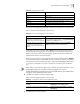
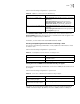
Tab le 57 Disable SNMP Agent
Operation Command
Disable snmp agent undo snmp-agent
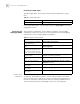
Tab le 58 Display and Debug SNMP
Operation Command
Display the statistics information
about SNMP packets
display snmp-agent statisitcs
Display the engine ID of the active
device
display snmp-agent { local-engineid |
remote-engineid }
Display the group name, the
security mode, the states for all
types of views, and the storage
mode of each group of the switch.
display snmp-agent group
Display the names of all users in the
group user table
display snmp-agent usm-user [ { local | { engineid
engineid } } | username groupname ]
Display the current community
name
display snmp-agent community [ read | write ]
Display the current MIB view display snmp-agent mib-view [ exclude | include | {
viewname mib-view } ]
Display the contact character string
of the system
display snmp-agent sys-info contact
Display the location character string
of the system
display snmp-agent sys-info location
Display the version character string
of the system
display snmp-agent sys-info version