
Switch 7700 Configuration Guide, v2

SNMP 25
The current SNMP Agent of Ethernet switch supports SNMP V1, V2C and V3. The
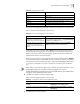
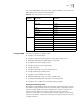
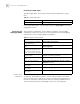
MIBs supported are listed in the following table.
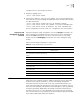
Configure SNMP The main configuration of SNMP includes:
■ Setting the Community Name
■ Setting the Method of Identifying and Contacting the Administrator
■ Enabling and Disabling the SNMP Agent to Send Trap
■ Setting the Destination Address of Trap
■ Setting the Lifetime of the Trap Message
■ Setting sysLocation
■ Setting the Engine ID of a Local or Remote Device
■ Setting and Deleting an SNMP Group
■ Setting the Source Address of the Trap
■ Adding and Deleting a User to or from an SNMP Group
■ Creating and Updating View Information or Deleting a View
■ Setting the Size of SNMP Packet Sent/Received by an Agent
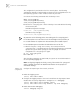
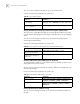
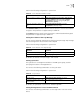
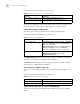
Setting the Community Name
Both SNMP V1 and SNMPV2C adopt the community name authentication scheme.
The SNMP message incompliant with the community name accepted by the device
will be discarded. SNMP Community is named with a character string, which is
called Community Name. The various communities can have read-only or
read-write access mode. The community with read-only authority can only query
the device information, whereas the community with read-write authority can also
configure the device.
Table 44 MIBs Supported by the Ethernet Switch
MIB
attribute
MIB content References
Public MIB MIB II based on TCP/IP network
device
RFC1213
BRIDGE MIB RFC1493
RFC2675
RIP MIB RFC1724
RMON MIB RFC2819
Ethernet MIB RFC2665
OSPF MIB RFC1253
IF MIB RFC1573
Private MIB DHCP MIB
QACL MIB
ADBM MIB
RSTP MIB
VLAN MIB
Device management
Interface management