
Switch 7700 Configuration Guide, v2

SNMP 23
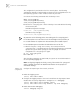
Configure the info-center loghost as follows:
1 Enable the logging system.
[SW7700] info-center enable
2 Set the host at 202.38.1.10 as info-center loghost, sets the severity threshold to
informational, the output language to English and allows the RSTP and IP modules
to output information.
[SW7700] info-center loghost 202.38.1.10 language english
[SW7700] info-center source rstp channel 5 log level informational
[SW7700] info-center source ip channel 4 log level informational
For the configurations at the host side, see “Configure the info-center loghost”.
Displaying and
Debugging the Syslog
Function
After performing the syslog configuration, execute the display command in all
views to display the configuration and to verify the effect of the configuration.
Execute the reset command in user view to clear the statistics of the syslog
module. Execute the debugging command in user view to debug the syslog
module.
Perform the following configuration in system view.
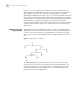
SNMP The Simple Network Management Protocol (SNMP) has gained the most extensive
application in the computer networks. SNMP has been put into use and widely
accepted as the industry standard. It is used for transmitting management
information between any two nodes. In this way, network administrators can
easily search and modify the information on any node on the network. They can
also locate faults promptly and implement the fault diagnosis, capacity planning
and report generating. SNMP adopts the polling mechanism and provides the
most basic function set. It is most applicable to the small-sized, fast-speed and
low-cost environment. It only requires the unverified transport layer protocol UDP;
and is widely supported by many other products.
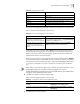
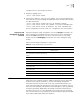
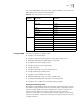
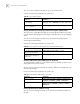
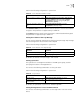
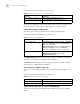
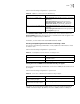
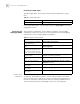
Table 43 Display and Debug the Syslog Function
Operation Command
View details about the information channel display channel [ channel-number |
channel-name ]
View the configuration of the system log and
the information recorded in the memory
buffer
display info-center
Reset the information in the log buffer reset logbuffer
Reset the information in the trap buffer reset trapbuffer
Enable terminal log information display terminal logging
Disable terminal log information display undo terminal logging
Enable the log debugging/log/trap on the
terminal monitor
terminal monitor
Disable the log debugging/log/trap on the
terminal monitor
undo terminal monitor
Enable terminal trap information display terminal trapping
Disable terminal trap information display undo terminal trapping