
Switch 7700 Configuration Guide, v2

16 CHAPTER 11: SYSTEM MANAGEMENT
■ Commands for displaying the system statistics information
For the display commands related to each protocols and different ports, refer to
the relevant chapters. The following display commands are used for displaying
the system state and the statistics information.
Perform the following operations in all views.
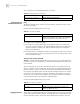
System Debugging Enable/disable the terminal debugging
The Switch 7700 provides various ways for debugging most of the supported
protocols and functions, which can help you diagnose errors.
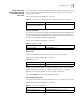
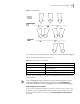
The following switches control the outputs of debugging information:
■ Protocol debugging switch controls debugging output of a protocol.
■ Terminal debugging switch controls debugging output on a specified user
screen.
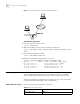
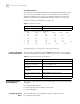
The figure below illustrates the relationship between two switches.
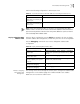
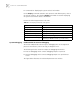
Tab le 32 The Display Commands of the System
Operation Command
Display the system clock display clock
Display the system version display version
Display the terminal user display users [ all ]
Display the saved-configuration display saved-configuration
Display the current-configuration display current-configuration
Display the state of the debugging display debugging [ interface { interface-name |
interface-type interface-number } ] [ module-name ]