
Switch 7700 Configuration Guide, v2

Device Management 13
Designate the APP
Adopted when Booting
the Ethernet Switch
Next Time
In the case that there are several operational images in the Flash Memory, you can
use this command to designate the operational file (*.app) file to use when the
Switch 7700 is booted.
Perform the following configuration in user view.
Upgrade BootROM
You can use this command to upgrade the BootROM with the BootROM program
in the Flash Memory. This configuration task facilitates the remote upgrade. You
can upload the BootROM program file from a remote end to the switch by FTP and
then use this command to upgrade the BootROM.
Perform the following configuration in user view.
Reset a slot
The Switch 7700 allows the administrator to reset a slot in the system.
Perform the following configuration in user view.
The parameter slot-num ranges from 0 to 6. 0 indicates to reset the Switch Fabric
module, taking the same effect as resetting the switch system. 1 through 6
indicates to reset the I/O modules in slots 1 through 6 respectively.
If you input reboot only, the whole system will be reset.
Set slot temperature limit
The switch system alarms when the temperature on a slot exceeds the preset limit.
Perform the following configuration in user view.
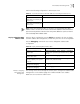
Table 22 Designate the APP Adopted When Booting the Ethernet Switch Next Time
Operation Command
Designate the APP adopted when
booting the Ethernet switch next
time
boot bootloader file-url
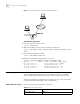
Table 23 Upgrade BootROM
Operation Command
Upgrade BootROM boot BootROM file-url
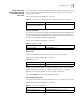
Table 24 Reset a Slot
Operation Command
Reset a slot reboot [ slot slot-num ]
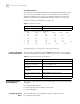
Table 25 Set Slot Temperature Limit
Operation Command
Set slot temperature limit temperature-limit slot down-value up-value