
Switch 7700 Configuration Guide, v2

12 CHAPTER 11: SYSTEM MANAGEMENT
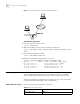
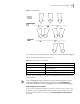
Figure 2 Typical Configuration of Address Table Management
Configuration procedure
1 Enter the system view of the switch.
<SW7700> system-view
2 Add a MAC address (specify the native VLAN, port and state).
[SW7700] mac-address static 00e0-fc35-dc71 interface Ethernet 1/0/2
vlan 1
3 Set the address aging time to 500s.
[SW7700] mac-address timer 500
4 Display the MAC address configurations in all views.
[SW7700] display mac-address interface Ethernet 1/0/2
MAC ADDR VLAN ID STATE PORT INDEX AGING TIME(s)
00-e0-fc-35-dc-71 1 Static Ethernet1/0/2 NOAGED
00-e0-fc-17-a7-d6 1 LearnedEthernet1/0/2 300
00-e0-fc-5e-b1-fb 1 Learned Ethernet1/0/2 300
00-e0-fc-55-f1-16 1 Learned Ethernet1/0/2 300
Device Management With device management, the Switch 7700 displays the current running state and
event debugging information about the slots and physical devices. In addition,
there is a command for rebooting the system, when a function failure occurs.
The device management configuration task is simple. As far as a user concerned, it
is mainly the display and debug the device management.
Reboot Ethernet Switch Perform the following configuration in user view.
Console port
Network port
Internet
Switch
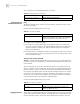
Tab le 21 Reboot Ethernet Switch
Operation Command
Root Ethernet switch reboot