
Switch 7700 Configuration Guide, v2

10 CHAPTER 11: SYSTEM MANAGEMENT
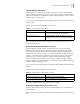
Perform the following configurations in the ethernet port view.
By default, the MAC address learning function is enabled.
Set MAC Address Aging Time
Setting an appropriate aging time implements MAC address aging. Too long or
too short an aging time set by subscribers will cause the Ethernet switch to
broadcast a large amount of data packets without MAC addresses. This affects the
switch operation performance.
If aging time is set too long, the Ethernet switch stores a great number of
out-of-date MAC address tables. This consumes MAC address table resources and
the switch will not be able to update MAC address table according to the network
change.
If aging time is set too short, the Ethernet switch may delete valid MAC address
table.
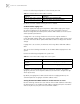
You can use the following commands to set the MAC address aging time for the
system.
Perform the following configuration in system view.
In addition, this command takes effect on all the ports. However, the address
aging only functions on the dynamic addresses (the learned or configured as age
entries by the user).
By default, the aging-time is 300 seconds. With the no-aging parameter, the
command performs no aging on the MAC address entries.
Setting the Maximum MAC Addresses an Ethernet Port can Learn
Use the following command to set an amount limit on MAC addresses learned by
the Ethernet port. If the number of MAC address learned by this port exceeds the
value set by the user, this port will not learn MAC address.
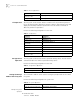
Tab le 17 Disable/Enable the MAC Address Learning
Operation Command
Disable the MAC address learning mac-address mac-learning disable
Enable the MAC address learning undo mac-address mac-learning disable
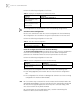
Tab le 18 Set the MAC Address Aging Time for the System
Operation Command
Set the dynamic MAC address
aging time
mac-address timer { aging age | no-aging }
Restore the default MAC address
aging time
undo mac-address timer aging-time