
Switch 7700 Configuration Guide, v2

MAC Address Table Management 7
server and then transmits data to it and receives the acknowledgement from it.
TFTP transmits files in two modes, binary mode for program files and ASCII mode
for text files.
TFTP configuration tasks include:
■ Configure the file transmission mode
■ Download Files by means of TFTP
■ Upload Files by means of TFTP
Configure the file transmission mode
TFTP transmits files in two modes; binary mode for program files and ASCII mode
for text files. You can use the following commands to configure the file
transmission mode.
Perform the following configuration in system view.
By default, TFTP transmits files in binary mode.
Download Files by means of TFTP
To download a file, the client sends a request to the TFTP server and then receives
data from it and sends acknowledgement to it. You can use the following
commands to download files by means of TFTP.
Perform the following configuration in system view.
Upload Files by means of TFTP
To upload a file, the client sends a request to the TFTP server and then transmits
data to it and receives the acknowledgement from it. You can use the following
commands to upload files.
Perform the following configuration in system view.
MAC Address Table
Management
The Switch 7700 maintains a MAC address table for fast forwarding packets. A
table entry includes the MAC address of a device and the port ID of the Ethernet
switch connected to it. The dynamic entries (not configured manually) are learned
by the Ethernet switch. The Ethernet switch learns a MAC address in the following
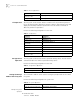
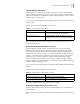
Table 12 Configure the File Transmission Mode
Operation Command
Configure the file transmission
mode
tftp { ascii | binary }
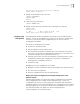
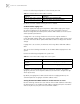
Table 13 Download Files by Means of TFTP
Operation Command
Download files by means of TFTP tftp get //A.A.A.A/xxx.yyy mmm.nnn
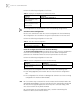
Table 14 Upload Files by Means of TFTP
Operation Command
Upload files by means of TFTP tftp put mmm.nnn //A.A.A.A/xxx.yyy