
Switch 7700 Configuration Guide, v2

File System Management 5
The Ethernet switch provides the following FTP services:
■ FTP server: You can run FTP client program to log in the server and access the
files on it.
■ FTP client: After connected to the server through running the terminal emulator
or Telnet on a PC, you can access the files on it, using FTP command.
FTP Server configuration includes:
■ Enable/Disable FTP Server
■ Configure the FTP Server Authentication and Authorization
■ Configure the Running Parameters of FTP Server
■ Display and debug FTP Server
Enable/Disable FTP Server
You can use the following commands to enable/disable the FTP server. Perform the
following configuration in system view.
FTP server supports multiple user access. A remote FTP client sends a request to the
FTP server. Then, the FTP server carries out the corresponding operation and
returns the result to the client.
By default, FTP server is disabled.
Configure the FTP Server Authentication and Authorization
You can use the following commands to configure FTP server authentication and
authorization. The authorization information of FTP server includes the top
working directory provided for FTP clients.
Perform the following configuration in system view.
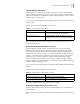
Table 8 Enable/Disable FTP Server
Operation Command
Enable the FTP server ftp server enable
Disable the FTP server undo ftp server
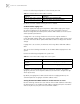
Table 9 Configure the FTP Server Authentication and Authorization
Operation Command
Create new local user and enter
local user view (system view)
local-user username
Delete local user (system view) undo local-user [ username | all [ service-type ftp ]]
Configure password for local user
(local user view)
password [ cipher | simple ] password
Configure service type for local user
(local user view)
service-type ftp ftp-directory directory
Cancel password for local user
(local user view)
undo password
Cancel service type for local user
(local user view)
undo service-type ftp [ftp-directory]