
Switch 7700 Configuration Guide, v2



268 CHAPTER 10: RELIABILITY
Perform the following configuration in VLAN interface view.
By default, adver-interval is configured to be 3.
Configuring a Switch to
Track an Interface
VRRP interface track function expands the backup function. Backup is provided
not only to the interface where the virtual router resides, but also to other
malfunctioning switch interfaces. By implementing the following command you
can track interfaces. If the interface that is being tracked fails, the priority of the
switch, including the interface, decreases automatically by the value specified by
value-reduced. The reduced priority of the switch results in comparatively higher
priorities of other switches within the virtual router, one of which becomes the
master switch, to track this interface.
Perform the following configuration in VLAN interface view.
By default, value-reduced is set at 10.
Note: When the switch is an IP address owner, its interfaces cannot be tracked.
Displaying and
Debugging VRRP
After you configure a virtual router, execute the display command in all views to
display the running of the VRRP configuration, and to verify the effect of the VRRP
configuration.
You can enable VRRP debugging to display how it runs. You can set the argument
option to packet or state to debug the VRRP packet or VRRP state, respectively.
By default, the switch disables debugging.
Example: VRRP Single
Virtual Router
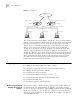
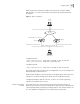
Host A uses the VRRP virtual router which combines switch A and switch B as its
default gateway to visit host B on the Internet.
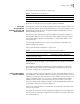
Tab le 7 Configure VRRP Timer
Operation Command
Configure VRRP timer vrrp vrid virtual-router-ID timer advertise adver-interval
Clear VRRP timer undo vrrp vrid virtual-router-ID timer advertise
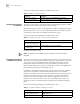
Tab le 8 Configure Switch to Track a Specified Interface
Operation Command
Configure to track a specified
interface
vrrp vrid virtual-router-ID track vlan-interface
interface-num [ reduced value-reduced ]
Stop tracking the specified
interface
undo vrrp vrid virtual-router-ID track [ vlan-interface
interface-num ]
Tab le 9 Display and Debug VRRP
Operation Command
Display VRRP state information. display vrrp [ interface vlan-interface interface-num ]
[ virtual-router-ID ]
Enable VRRP debugging. debugging vrrp { state | packet }
Disable VRRP debugging. undo debugging vrrp { state | packet }